

L2ForYou website updates 2026 february
Over the past months, L2ForYou has received multiple updates aimed at improving usability, filtering accuracy, and overall server discovery. Some changes were small, others more significant — but all were designed with one goal in mind: helping players find the right Lineage 2 server with less noise and more clarity.
Here’s a quick overview of what’s new.
Recommended Servers
We've added a Recommended Servers list, where projects are grouped into categories by rates and game versions. Each category can contain up to five servers. Some categories are still not full — if you think your project deserves a spot, feel free to contact us. The main criteria are community (an active Discord is required), no monthly wipes or reopening of the same server, and an accessible website with clear server description and multi-language support. Our goal is to highlight stable, long-term projects with healthy communities.
Advanced Filtering
We’ve significantly upgraded our filters to give you more control when searching for a server. Each feature (mod) now works in three states:
- Neutral — default, no filtering
- Green — only show servers with this feature
- Red — exclude servers with this feature
This allows you to combine positive, negative, and neutral filters to fine-tune results exactly to your preferences. For example, you can display all Lineage 2 low-rate servers (rates 1–10) without auto-hunt and dualbox (auto-hunt — negative, no dualbox — negative), while requiring in-game buffer and champion monsters (buffer — positive, champions — positive) — leaving everything else neutral.
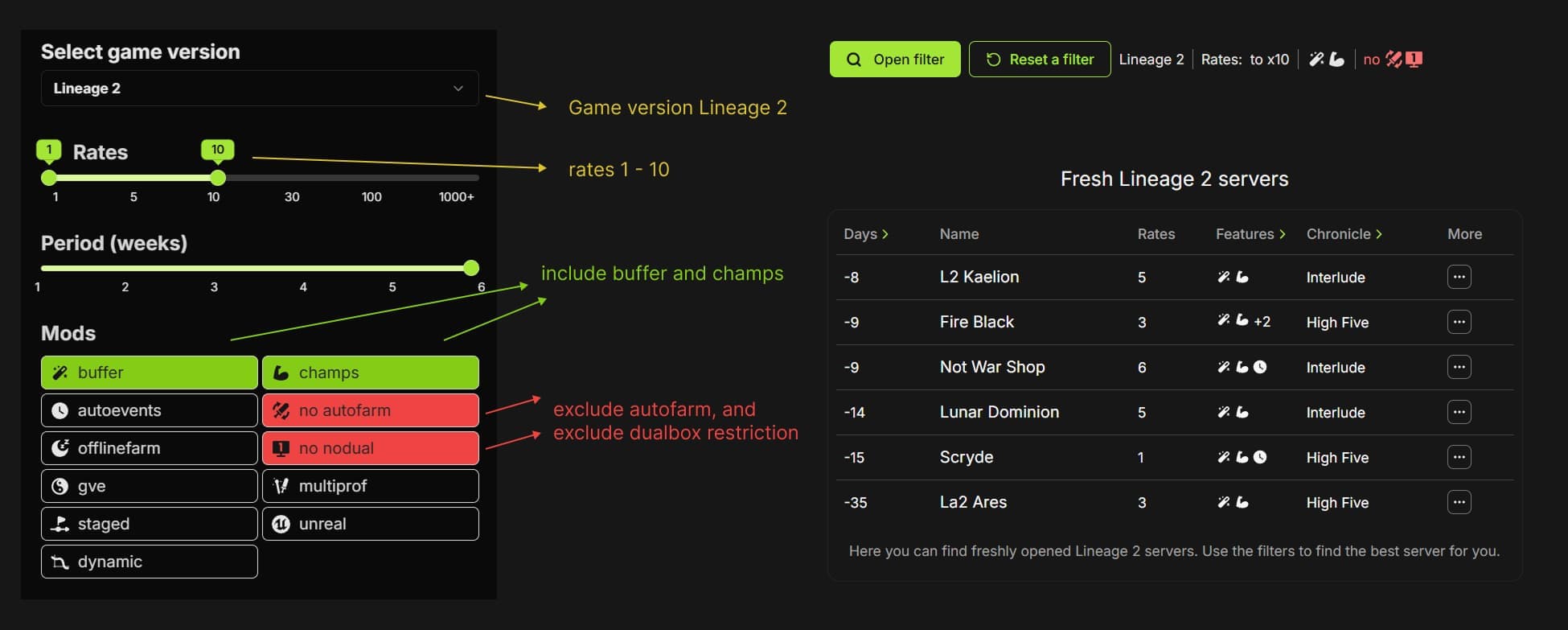
Mix filters freely to find your ideal server in just a few clicks.
Favorites & Hidden Projects
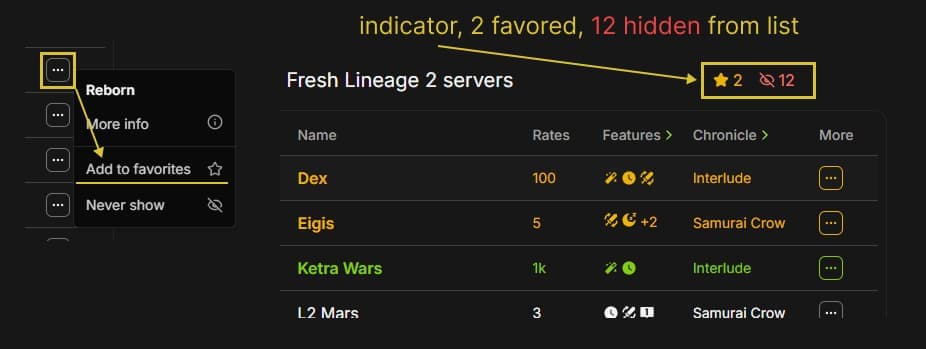
You can now mark projects as favorites or hide them from your lists. Favorite projects are highlighted in gold, making it easy to spot when your preferred server is opening. Each server list also shows a favorite counter, indicating how many servers in that list belong to your favorites.
If, on the other hand, you feel certain projects aren’t worth your time, you can hide them. Hidden projects will no longer appear in any server lists — you’ll only see a small indicator showing how many projects are currently hidden.
To manage your preferences, simply click this indicator. It opens a page where all your favorite and hidden projects are listed, and you can change your mind at any time by removing a project from either list.
To add or remove a project from favorites or hidden, just right-click a server in the list (or use the More button).
Images below show the favorites/hidden counter above the list and the “More” button with available actions.
Server Search
You can now search for projects using the search bar by entering part of the server name or website URL. This is especially useful if you’re looking for a specific server that might not currently appear in the main lists.
Custom Server Page Content
Server owners can customize their server page by adding a banner (recommended size: 1400×240 px) and an intro text. Intro text supports up to three languages (EN / RU / PT). If, for example, only English and Russian are provided, users with Portuguese selected simply won’t see any text. Russian users will see the RU version, English users the EN version. Both plain text and Markdown are supported, allowing more advanced layouts if needed.
